USB-C Hubs With SD Card Readers for Photographers
If you shoot on SD or microSD and edit on a USB-C laptop, the question is really about skipping a separate card reader and cable clutter. A hub built for this needs a card slot that actually matches your card type, enough pass-through wattage to keep your laptop charging while you offload a shoot, and an HDMI output clean enough for reviewing images on a bigger screen.
Not every USB-C hub in this category actually includes an SD slot — plenty add HDMI and extra USB ports but assume you already own a card reader. This guide separates hubs with a built-in SD/TF slot from strong alternatives that make sense if you'd rather keep a dedicated high-speed reader and want the hub to handle everything else: display, power, and fast data ports.
Picks below were chosen from listed specs and aggregated buyer feedback, prioritizing card slot presence, pass-through charging wattage, HDMI resolution, and USB transfer speed — the specs that actually affect a photo or video import workflow.
We may earn a commission at no extra cost to you.

Hiearcool USB C Hub for MacBook – 7-in-1 USBC Adapter with 4K HDMI, 100W PD, USB 3.0 5Gbps Ports, SD/TF Card Reader – USB-C Dongle for Office, Meetings, Travel & Home Setup-Space Grey
Built-in SD/TF card slot plus 100W PD pass-through means you can offload a shoot while your laptop keeps charging, and the 4K HDMI output covers reviewing images on an external display. The aluminum body is aimed at longer import sessions without overheating.
- +100W PD pass-through keeps laptop charging while hub is in use
- +SD/TF card slots useful for offloading photos and video
- +4K HDMI output covers monitors, projectors and presentations
- −HDMI limited to 4K at 30Hz, not smooth for motion-heavy content
- −USB 3.0 ports cap at 5Gbps, slower than USB 3.1/3.2 or Thunderbolt hubs

Anker USB C Hub, 7-in-1 Multi-Port USBC Hub, 4K HDMI USB-C Adapter | 1 USB-C and 2 USB-A 5Gbps Ports, 85W Max PD, SD/TF, for MacBook Air, MacBook Pro, XPS and More (Charger Not Included)
Also has an SD/TF slot alongside 5Gbps USB-A and USB-C data ports, so it covers the same core need as the top pick with 85W pass-through charging. Worth choosing if you'd rather buy from Anker's lineup or already run a separate PD charger, since one isn't included.
- +7-in-1 design covers HDMI, cards, and USB in one unit
- +85W USB-C PD pass-through charging support
- +5Gbps USB-A and USB-C data ports for fast transfers
- −HDMI output limited to 4K at 30Hz, not 60Hz
- −Charger not included, needed for pass-through charging

UGREEN Revodok Pro USB-C Hub 6 in 1 10Gbps 4K 60Hz HDMI | 100W PD charging, compatible with MacBook Neo/Pro/Air, iPad Pro, Thinkpad Rog Ally and More
No built-in card slot, but its 10Gbps USB-C and USB-A ports move files roughly twice as fast as the SD-equipped picks above, and the HDMI output runs at a smoother 4K 60Hz for editing. Makes sense if you already carry a dedicated high-speed card reader and care more about transfer speed and display quality.
- +Two 10Gbps USB-C and two 10Gbps USB-A ports for fast transfers
- +100W PD passthrough keeps your laptop charging while docked
- +4K 60Hz HDMI output covers most single-monitor setups
- −Only one HDMI port, no support for dual external displays
- −No Ethernet port included for wired networking
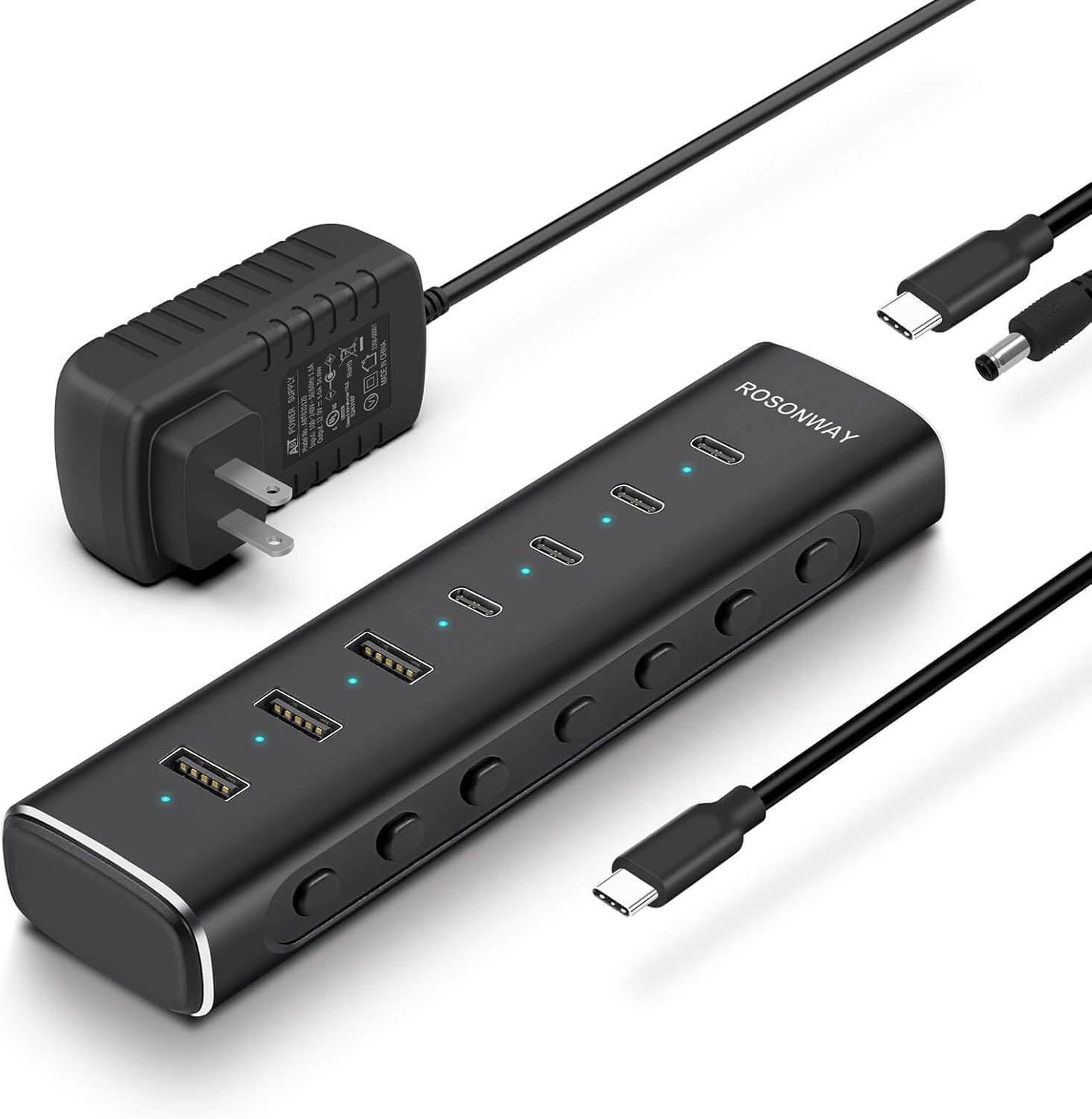
7 Ports Powered USB 3.2/USB C Hub 10Gbps with 4 USB-C 3.2, 3 USB-A 3.2 Ports, 3.3ft Cable and 36W(12V/3A) Power Adapter, Aluminum USB Splitter for Laptop, RSH-H7C4
Seven ports all rated at 10Gbps, powered by its own 36W adapter, so you can run a separate SD reader dongle, an external SSD, and other accessories at once without the bus-power slowdowns a bare laptop port can cause. Built for a fixed studio desk, not a camera bag.
- +Seven ports total: four USB-C, three USB-A
- +All ports rated for 10Gbps transfer speed
- +36W adapter powers multiple drives simultaneously
- −Power adapter and cable add desk clutter
- −Detachable host cable is only 3.3 feet

UGREEN Revodok 6 in 1 USB C Hub Gigabit Ethernet Adapter with 4K HDMI | 100W PD Charging,USB A Data Ports Compatible with MacBook Neo/Pro/Air M1, M2, M3, M4,M5,iPad, iPhone 17/16, Steam Deck
Gigabit Ethernet plus 100W PD pass-through suits studio setups where you're tethering to network storage or a wired connection during a shoot rather than pulling cards. No SD slot, so pair it with a standalone reader if you also shoot on removable media.
- +Gigabit Ethernet for stable wired connections
- +100W PD input keeps laptop charged while docked
- +Three USB-A 3.0 ports at up to 5Gbps
- −HDMI limited to 4K@30Hz, no HDR or 3D
- −USB-C port only charges, no data or video passthrough
What to look for
The single most important line item is whether SD/TF is actually listed as a port — a lot of 5-in-1 and 6-in-1 hubs skip it entirely in favor of more USB-A or Ethernet, so don't assume a 'multiport' hub covers your cards. After that, look at USB data speed: 5Gbps (USB 3.0) is fine for typical photo imports, but if you shoot a lot of 4K/6K video or use an external SSD alongside the card slot, a 10Gbps-rated port cuts real time off a big transfer. Pass-through PD wattage matters too — 100W keeps most USB-C laptops charging at full speed while the hub is plugged in and drawing power for the card reader and display, while lower-wattage hubs may let your battery slowly drain during a long editing session.
HDMI spec is the other thing worth reading closely: 4K at 30Hz is fine for still photo review but feels choppy for scrubbing through video, so if you edit motion footage on an external monitor, look specifically for 4K at 60Hz.
This guide is compiled from manufacturer specifications and aggregated customer feedback on Amazon, with AI assistance in drafting. We have not personally tested every product listed. Prices and availability change frequently — always confirm on Amazon before buying.