Wired Ergonomic Keyboards That Skip Batteries Entirely
If your wrists ache or you're managing carpal tunnel symptoms, you want two things a lot of keyboards don't offer together: a shape that keeps your hands in a neutral position, and a plain USB cable so you're not pairing Bluetooth or swapping AA batteries every few months. That second part rules out most of the ergonomic keyboards on the market right now, since the category has moved heavily toward wireless.
What actually separates these picks is the split or curved layout (how far it rotates your wrists out of a flat, pronated position), whether there's a built-in palm rest, and how the key switches feel under sustained typing. A few also differ in size — full 110-key layouts with a numpad versus more compact designs — which matters if you use the numpad daily or would rather reclaim desk space.
This list sticks to keyboards that connect over a physical USB cable with no battery or charging requirement, plus one rechargeable split-keyboard option included for comparison in case a cord turns out to matter less to you than avoiding disposable batteries.
We may earn a commission at no extra cost to you.
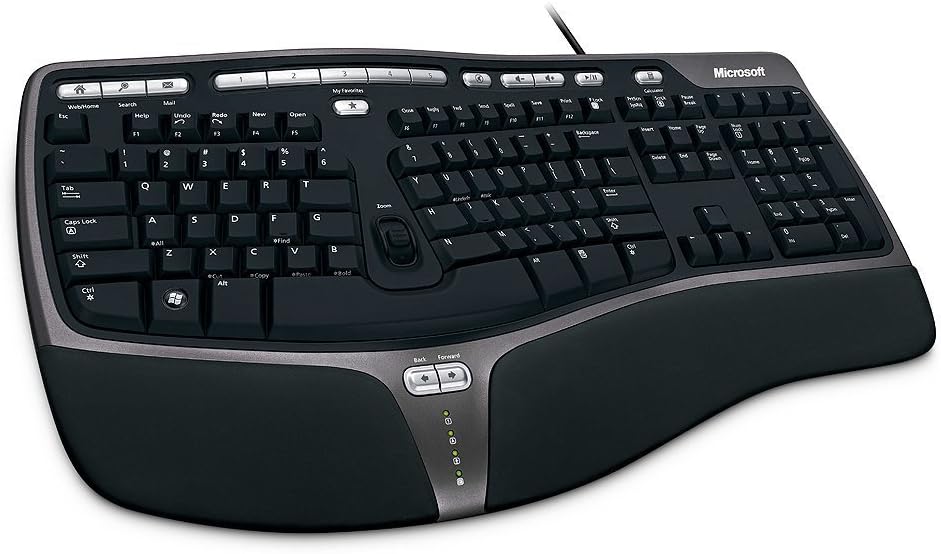
Microsoft Wired Natural Ergonomic Keyboard 4000, Retail
The split design, cushioned palm rest, and adjustable palm lift target the exact wrist positioning carpal tunnel advice recommends, and the wired USB connection means no pairing and no batteries to replace. It's a large keyboard, so it needs real desk space, but it's a long-standing benchmark in the wired ergonomic category.
- +Split design promotes natural wrist and forearm position
- +Cushioned palm rest and adjustable palm lift for comfort
- +Wired USB connection, no batteries or pairing needed
- −Wired only, no Bluetooth or wireless option
- −Large footprint (19.8" x 10.3") needs desk space

Perixx PERIBOARD-512B Wired Ergonomic Keyboard - Split Keyboard, Wrist Rest, Natural Typing - Wired USB Connectivity - US English - Black
A split layout with 4.2mm key travel gives tactile feedback for people who want to feel each keystroke, and it's rated for 20 million keystrokes so it holds up under daily use. Wired only, no wireless mode to worry about, at a lower cost than the Microsoft option.
- +Split design supports a more natural wrist position
- +4.2 mm key travel gives tactile, defined feedback
- +Rated for up to 20 million keystrokes
- −Membrane switches, not true mechanical
- −Split layout requires a 1-2 week adjustment period

X9 Wired Ergonomic Keyboard with Cushioned Wrist Rest - Type Comfortably Longer - USB Wired Split Keyboard for Laptop, PC & Chrome Computer with 110 Ergo Keys & 5ft Cable
Most split ergonomic keyboards drop the numpad to save space; this one keeps the full 110-key layout including numeric keys, so it fits people who need number entry daily but still want the wrist-neutral split shape. Wired with a 5ft cable and an adjustable kickstand for tilt.
- +Split wave design promotes a more natural wrist position
- +Full 110-key layout with numeric keypad and shortcuts
- +Plug-and-play USB-A, no driver installation needed
- −No backlighting, unsuitable for low-light typing
- −Wired only, no Bluetooth or wireless option

KM21Pro Wired Keyboard and Mouse Combo, 4X Larger Print Backlit Keys, Palm Rest, Ergonomic Design, USB Plug & Play for Windows PC Laptop, Ideal for Seniors, Students, Home & Office
Wired, plug-and-play, and built with 4x larger printed keys and a 7-degree angled palm rest, this suits anyone who needs both an easier-to-read keyboard and reduced wrist strain, without dealing with wireless setup or batteries.
- +4x larger print keys aid readability for seniors and low-light use
- +7-color adjustable backlighting with brightness control
- +Integrated palm rest with 7° angle to reduce wrist strain
- −Wired only, limiting desk placement and portability
- −Not built for gaming or high-precision tasks

TECKNET Wireless Ergonomic Keyboard Rechargeable, 2.4G+Bluetooth Ergo Cordless USB Computer Keyboard, Wrist Rest, Natural Typing, Stain-Resistant Fabric, Compatible For Windows Computer Desktop Laptop
This one is wireless, not wired, so it's a deliberate departure from the core ask. Include it only if what you're really trying to avoid is buying AA or AAA batteries rather than a cord itself — it has a similar split, curved shape and cushioned wrist rest, just charged instead of plugged in.
- +Built-in dual-density foam wrist rest for wrist support
- +Supports Bluetooth and 2.4GHz across up to 4 devices
- +Rated for up to 200 hours per charge
- −Fixed split, not a fully separable ergonomic layout
- −Plastic construction, no premium material listed
What to look for
The spec that actually predicts wrist comfort is the split angle and tilt, not the word "ergonomic" in the title. A true split layout lets your hands rest at shoulder width with your palms facing more inward, which is the position most carpal tunnel guidance points toward. Negative tilt (front edge higher than the back) is worth checking for specifically — it keeps your wrists from bending upward the way a flat keyboard forces them to. A cushioned, attached wrist or palm rest is a real plus since it can't get misplaced, but it only helps if you rest your palms, not your wrists, on it while typing.
Beyond shape, look at switch type and keystroke rating if you type heavily: membrane switches (common in this category) feel softer and are quieter, while a stated keystroke durability figure (like 20 million) tells you the switches are built for years of daily use rather than light home use. Going wired removes two variables that matter for hand strain indirectly — no dead batteries mid-task forcing you to grip harder or reposition, and no input lag that might make you overreach or retype.
This guide is compiled from manufacturer specifications and aggregated customer feedback on Amazon, with AI assistance in drafting. We have not personally tested every product listed. Prices and availability change frequently — always confirm on Amazon before buying.