Wireless Mice With 5-Level DPI Adjustment: Five Options Compared
By TechItSpot · Research-based buying guide. Updated 2026-10-19. How we compare products
At a glance
- AOC Ergonomic Mouse, 2.4GHz Wireless Bluetooth Vertical Mouse, Rechargeable Multiple devices
- E-YOOSO Wireless Mouse for Laptop, Portable Optical Computer Mouse, 6 Buttons, Cordless 2.4GHz with USB Receiver, 5-Level 4800 DPI, 18 Months Battery Life for PC Chromebook Windows Mac LED indicator
- TECKNET Rechargeable Slim Portable Silent Computer 2.4 GHz Wireless Mouse USB-C rechargeable
- wegear USB Wireless Mouse for Laptop PC Mac, 2.4GHz Cordless Mouse-Black | Ergonomic Portable Optical Computer Mice with 6 Buttons, 5-Level Adjustable 4000 DPI,24-Month Battery Life AA battery life
- TECKNET Wireless Mouse, 2.4G Ergonomic Computer Mouse, 2600 DPI, Purple | Ergonomic Design with Side Grips, Adjustable DPI, 2-Year Battery, Compact Size, USB-A Plug & Play, Wide OS Compatibility Rubber side grips
If you want five DPI steps and the most connection options, start with the AOC vertical mouse. It offers Bluetooth, a 2.4GHz receiver and three paired devices, but its vertical shape feels different from a standard mouse. If you prefer a conventional shape, the E-YOOSO and TECKNET slim models also list five DPI levels and top out at 4800 and 4000 DPI.
All five picks below explicitly list five DPI levels and a wireless connection. Several other mice in this pool list three, four or six levels instead, so they are left out. These five differ in DPI range, power source, Bluetooth support and shape.
This guide compares supplied product information only. TechItSpot has not used these mice, so comfort, click feel and tracking quality are not covered here.
We may earn a commission at no extra cost to you.
The picks
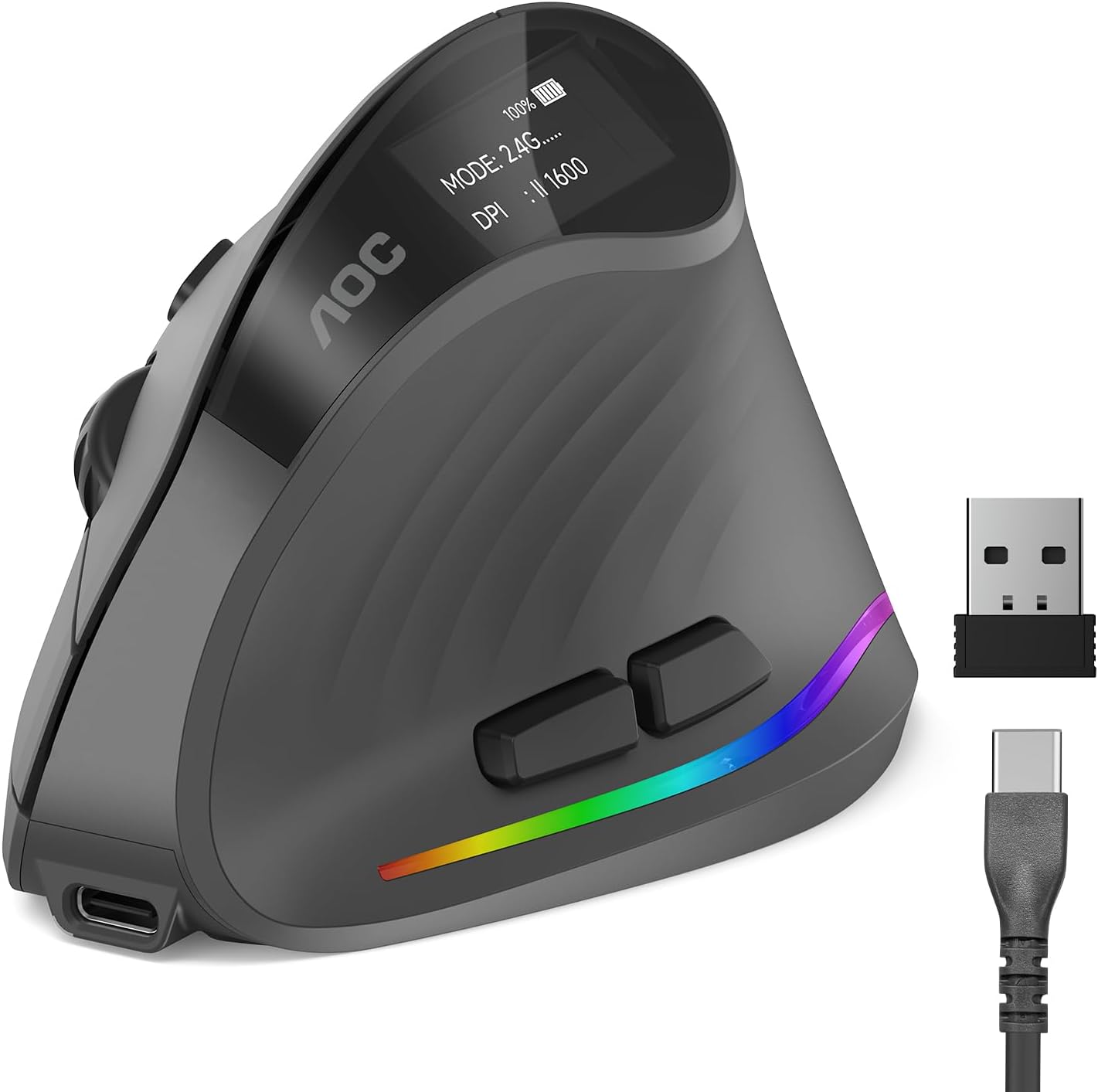
AOC Ergonomic Mouse, 2.4GHz Wireless Bluetooth Vertical Mouse, Rechargeable
Lists five DPI levels from 1000 to 4800 DPI, sharing the highest listed maximum with the E-YOOSO. It connects over Bluetooth or a 2.4GHz USB receiver and pairs with up to three devices. It is rechargeable and rated up to 200 hours with RGB off, dropping to about 40 hours with RGB on. Only the left and right clicks are listed as quiet. Check the shape before buying: it is a vertical mouse at 110 x 74 x 80 mm. The seller recommends it for medium hands (hand length 6.7 to 7.5 in), and the site's unvalidated estimate is 15.5 to 18.5 cm. Choose a standard-shape pick if you do not want a vertical grip.
- +52° vertical grip reduces wrist twisting over long sessions
- +Five DPI levels from 1000 to 4800 for flexible precision
- +Up to 200 hours battery life with RGB off
- −RGB use cuts battery life down to about 40 hours
- −Only left and right clicks are quiet, not all buttons

E-YOOSO Wireless Mouse for Laptop, Portable Optical Computer Mouse, 6 Buttons, Cordless 2.4GHz with USB Receiver, 5-Level 4800 DPI, 18 Months Battery Life for PC Chromebook Windows Mac
A conventional-shape 2.4GHz mouse with five DPI levels up to 4800 DPI and a listed LED indicator. It has six buttons, a receiver that stores inside the mouse and an 18-month battery rating. It measures 107 x 71 mm, with an unvalidated site fit estimate of 15.5 to 18 cm. Limits: no Bluetooth is listed, side buttons are listed as not working on Mac, and the supplied data does not give the lower DPI step values.
- +Plug-and-play USB receiver, no pairing required
- +Receiver stores inside the mouse for travel
- +Five DPI levels with LED indicator
- −Side buttons do not work on Mac
- −No Bluetooth option listed

TECKNET Rechargeable Slim Portable Silent Computer 2.4 GHz Wireless Mouse
Five DPI levels from 800 to 4000 in a slim, ambidextrous 2.4GHz mouse that recharges over USB-C. It suits you if you want five steps without buying disposable batteries. TECKNET rates the silent buttons to cut click noise by up to 90 percent, and the receiver stores inside the mouse. It measures 109 x 58 mm, with an unvalidated site fit estimate of 15.5 to 18 cm. Check before buying: no Bluetooth is listed. The supplied information also does not confirm whether back and forward buttons are included, so verify that before buying if you need them.
- +Rechargeable over USB-C, no disposable batteries
- +Silent buttons rated to cut click noise up to 90%
- +Five DPI levels from 800 to 4000
- −No Bluetooth listed, so the receiver needs a port
- −No side or programmable buttons mentioned

wegear USB Wireless Mouse for Laptop PC Mac, 2.4GHz Cordless Mouse-Black | Ergonomic Portable Optical Computer Mice with 6 Buttons, 5-Level Adjustable 4000 DPI,24-Month Battery Life
Lists five DPI levels from 800 to 4000, six buttons and a plug-and-play 2.4GHz USB receiver. It is rated for up to 24 months on one AA battery, which suits you if you would rather swap a battery rarely than recharge. Limits: side buttons are listed as not working on Mac, and it connects through the USB receiver rather than Bluetooth.
- +Rated for up to 24 months on one AA battery
- +Plug-and-play USB receiver, no drivers needed
- +5 DPI levels from 800 to 4000
- −Side buttons don't work on Mac
- −No Bluetooth, relies on USB receiver only

TECKNET Wireless Mouse, 2.4G Ergonomic Computer Mouse, 2600 DPI, Purple | Ergonomic Design with Side Grips, Adjustable DPI, 2-Year Battery, Compact Size, USB-A Plug & Play, Wide OS Compatibility
A compact 2.4GHz mouse with five DPI levels from 800 to 2600, rubber side grips and a USB-A receiver. The seller recommends it for small to medium hands. It measures 107 x 69 x 38 mm, with an unvalidated site fit estimate of 15.5 to 18 cm. It suits laptop-bag use where a lower top DPI is enough. Check before buying: its 2600 DPI ceiling is the lowest here, it runs on AAA batteries that are not included, the side button is listed as not working on Mac, and USB-C-only laptops need an adapter.
- +Compact, travel-friendly size for bags and laptops
- +Five DPI levels (800-2600) for adjustable precision
- +Rubber side grips add thumb support
- −AAA batteries not included
- −Side button not functional on Mac
What to look for
Five DPI levels tells you how many steps you can cycle through, not how useful those steps are. Look at the range instead. A 1000 to 4800 range like the AOC's starts higher and reaches further than an 800 to 2600 range like the TECKNET 24's. A lower bottom step helps with slow, precise work. A higher top step moves the cursor across large or multiple screens with less hand movement. For the E-YOOSO, the supplied data gives only the 4800 DPI maximum, so its individual step values are unknown, not confirmed. The same applies to the intermediate steps on every pick, since only the endpoints are listed.
Then run a practical check. First, make sure your computer has a port that fits the receiver. The TECKNET 24 lists a USB-A plug, so a USB-C-only laptop would need an adapter. The receiver plug type for the other picks is not stated. Second, if you use a Mac, note that side buttons are listed as not working on macOS for the TECKNET 24, the wegear and the E-YOOSO. Third, decide how you want to power it. The AOC and TECKNET slim have built-in rechargeable batteries. The wegear and TECKNET 24 use disposable AA or AAA cells. Fit ranges below are the site's unvalidated estimates based on listed length. They are not a comfort guarantee, and grip style changes how a mouse feels.
Related buying guides
Our guides use published specifications and Amazon listing information, with AI assistance in research and drafting. We do not conduct hands-on testing. Amazon customer ratings are not our own scores. Prices and availability change frequently — always confirm on Amazon before buying.