Ergonomic Keyboard and Mouse Pairings for Shoulder Pain
Shoulder pain at a desk usually traces back to two habits: reaching forward with rounded shoulders to type on a flat keyboard, and holding your forearm twisted (pronated) all day to use a standard mouse. A split or curved keyboard lets your arms rest at a more natural, shoulder-width angle instead of pulling your elbows inward. A vertical mouse keeps your forearm in a handshake position instead of twisted flat, which reduces the tension that travels up into the shoulder and neck.
The products below split into two groups: true keyboard-and-mouse combos sold as one unit, and standout split keyboards paired with a vertical mouse from the same catalog. Both approaches work — a combo is simpler to buy, but pairing a dedicated split keyboard with a dedicated vertical mouse usually gives you more adjustment range for a specific shoulder issue.
Rankings here are based on published ergonomic design details (split angle, vertical grip degree, wrist/palm support) and patterns in aggregated buyer feedback, not hands-on testing.
We may earn a commission at no extra cost to you.
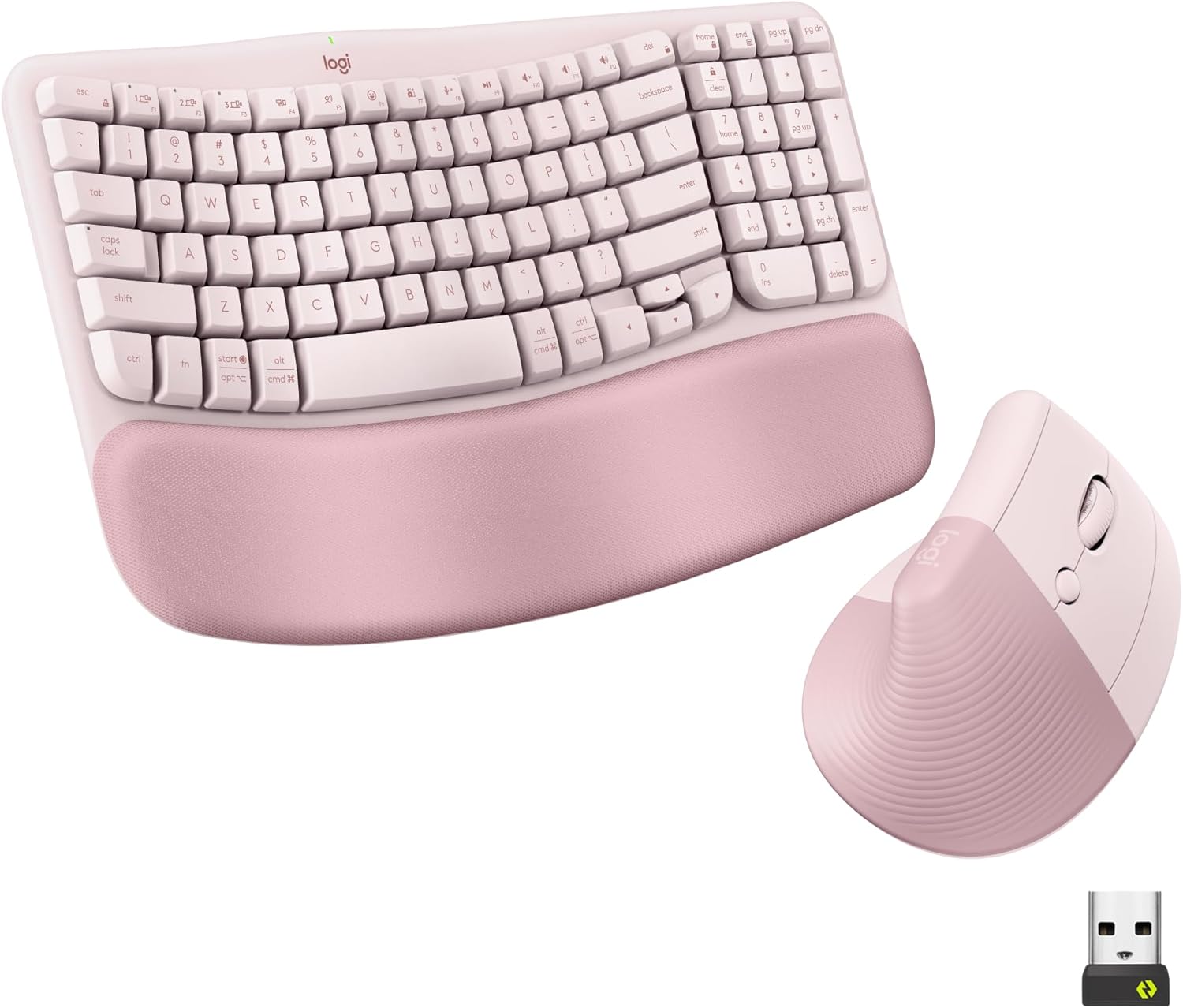
Logitech Wave Keys Keyboard & Lift Mouse Ergonomic Combo - Rose | Cushioned Palm Rest, wireless, Bluetooth, Easy-Switch, Multi-OS, Windows/Mac
Pairs a wave-shaped, cushioned keyboard with the vertical Lift mouse in one purchase, addressing both the shoulder-rounding keyboard reach and the forearm-twisting mouse grip that contribute to shoulder pain.
- +Cushioned memory foam palm rest for wrist support
- +Bluetooth and Logi Bolt receiver support multi-device switching
- +Vertical mouse angle reduces forearm rotation strain
- −Lift mouse sized for small to medium hands only
- −No wired connection option for low-latency use

Logitech Ergo K860 Wireless Ergonomic Split Keyboard with Wrist Rest | Curved split keyframe, pillowed wrist rest, Bluetooth, USB connectivity with included USB Receiver, Windows Mac compatible
The curved, split keyframe and three tilt-leg angles (including negative tilt) let you widen your typing stance to shoulder width, which is the main fix for shoulder pain caused by reaching inward all day.
- +Split, curved layout designed to ease wrist strain
- +Three tilt-leg angles including negative tilt options
- +Attached memory foam wrist rest, nothing to misplace
- −Fixed split, not a fully separable two-piece keyboard
- −No per-key backlighting, only single-color options

Logitech Mouse MX Vertical, 910-005448
A 57-degree adjustable vertical grip pairs naturally with a split keyboard like the K860, and its high Amazon rating volume suggests it holds up for buyers doing long daily sessions.
- +Vertical, adjustable angle designed to reduce wrist strain
- +Connects via Bluetooth, USB receiver, or RF
- +Rated 4.6/5 across over 13,700 Amazon ratings
- −Vertical shape is a change from standard mouse grips
- −No DPI or button count listed in the specs
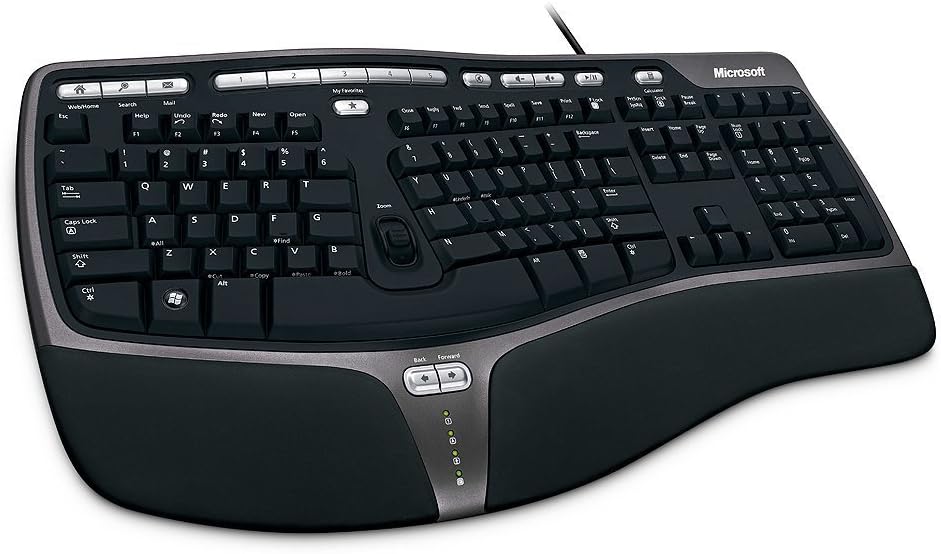
Microsoft Wired Natural Ergonomic Keyboard 4000, Retail
A wired split design with a cushioned palm rest and adjustable palm lift, for anyone who wants the shoulder-position benefit of a split layout without paying for wireless or backlighting.
- +Split design promotes natural wrist and forearm position
- +Cushioned palm rest and adjustable palm lift for comfort
- +Wired USB connection, no batteries or pairing needed
- −Wired only, no Bluetooth or wireless option
- −Large footprint (19.8" x 10.3") needs desk space

Perixx PERIBOARD-512B Wired Ergonomic Keyboard - Split Keyboard, Wrist Rest, Natural Typing - Wired USB Connectivity - US English - Black
Curved keycaps and a split layout rated for 20 million keystrokes give a durable, no-battery option for people who want the shoulder-friendly split shape but prefer a wired setup.
- +Split design supports a more natural wrist position
- +4.2 mm key travel gives tactile, defined feedback
- +Rated for up to 20 million keystrokes
- −Membrane switches, not true mechanical
- −Split layout requires a 1-2 week adjustment period

Wireless Keyboard and Mouse Combo, 2.4G Quiet Ergonomic Curved Keys(Black) | Full Size Ergonomic Curved Keyboard, 3-Level DPI Adjustable Silent Mouse for Windows, Mac OS, Desktop/Laptop/Office and Home
A lower-cost curved keyboard and adjustable-DPI mouse combo for anyone who wants to test whether an ergonomic curve helps their shoulder pain before spending more on a split or vertical setup.
- +Curved keyboard layout with adjustable tilt legs
- +Quiet keys and mouse clicks for shared spaces
- +Simple plug-and-play 2.4GHz USB receiver setup
- −DPI tops out at 1600, low for precision tasks
- −No wrist rest or split-key ergonomic design

TECKNET Ergonomic Mouse, Wireless Bluetooth Vertical Mouse, 4800 DPI Optical Tracking, 6 Adjustable DPI, Quiet Clicks, 2.4GHz with USB A Receiver, 12 Months Battery, 6 Buttons, Wide Compatibility
A vertical grip mouse with six DPI levels at a lower price point, useful as an add-on if you already own a flat keyboard you like and just want to address forearm twist first.
- +Vertical grip angle designed to ease wrist strain
- +Six DPI levels from 800 to 4800
- +Bluetooth and 2.4GHz modes, two-device Bluetooth pairing
- −Right-handed shape only, no left-hand option
- −Side buttons don't work on macOS
What to look for
For shoulder pain specifically, two specs matter more than DPI or button count: the keyboard's split/curve and the mouse's grip angle. A keyboard that separates the two halves (even a fixed split like the Ergo K860 or Microsoft 4000) lets your shoulders stay in a neutral, un-rounded position instead of pulling both arms toward the center. A vertical mouse's grip angle — usually listed in degrees, like 52° or 57° — tells you how close to a true handshake position your forearm sits; higher numbers mean less forearm twist, which is the motion that often refers pain up into the shoulder.
Also check wrist/palm rest design and battery type before buying. A built-in, non-removable palm rest (as on the K860 or Microsoft 4000) means one less part to lose or misalign, while a rechargeable mouse avoids the added forearm strain of frequently swapping AA batteries. If you already know a full split keyboard feels like overkill, a wave-shaped or curved combo is a lower-commitment way to test whether shoulder posture is actually the source of the pain before investing in a two-piece setup.
This guide is compiled from manufacturer specifications and aggregated customer feedback on Amazon, with AI assistance in drafting. We have not personally tested every product listed. Prices and availability change frequently — always confirm on Amazon before buying.