Wireless Keyboard and Mouse Combos for Outfitting Office Teams
When an office is buying keyboards and mice for a whole team, the question isn't just "wireless or wired." It's whether the gear can pair with multiple machines without IT tickets, whether it stays quiet in an open floor plan, and whether the battery life won't have someone asking for AAs every month. A combo also needs to work the same way whether the person next to you is on Windows or Mac.
The options here split into a few groups: true bundled keyboard-and-mouse combos sold as one purchase, standalone ergonomic keyboards and mice worth pairing separately for teams with wrist-strain concerns, and budget pieces meant for outfitting a lot of desks at once without a big spend per seat. Gaming-focused boards and mice with RGB, high DPI ceilings, or esports-grade switches were left out — none of that helps a shift worker or an accounts team, and most of those products carry shorter documented wireless battery life anyway.
Picks below were chosen from published specs on connectivity (Bluetooth channel count, receiver type), battery life, noise level, and cross-platform support, plus what buyer feedback consistently flags about typing feel and multi-device switching.
We may earn a commission at no extra cost to you.
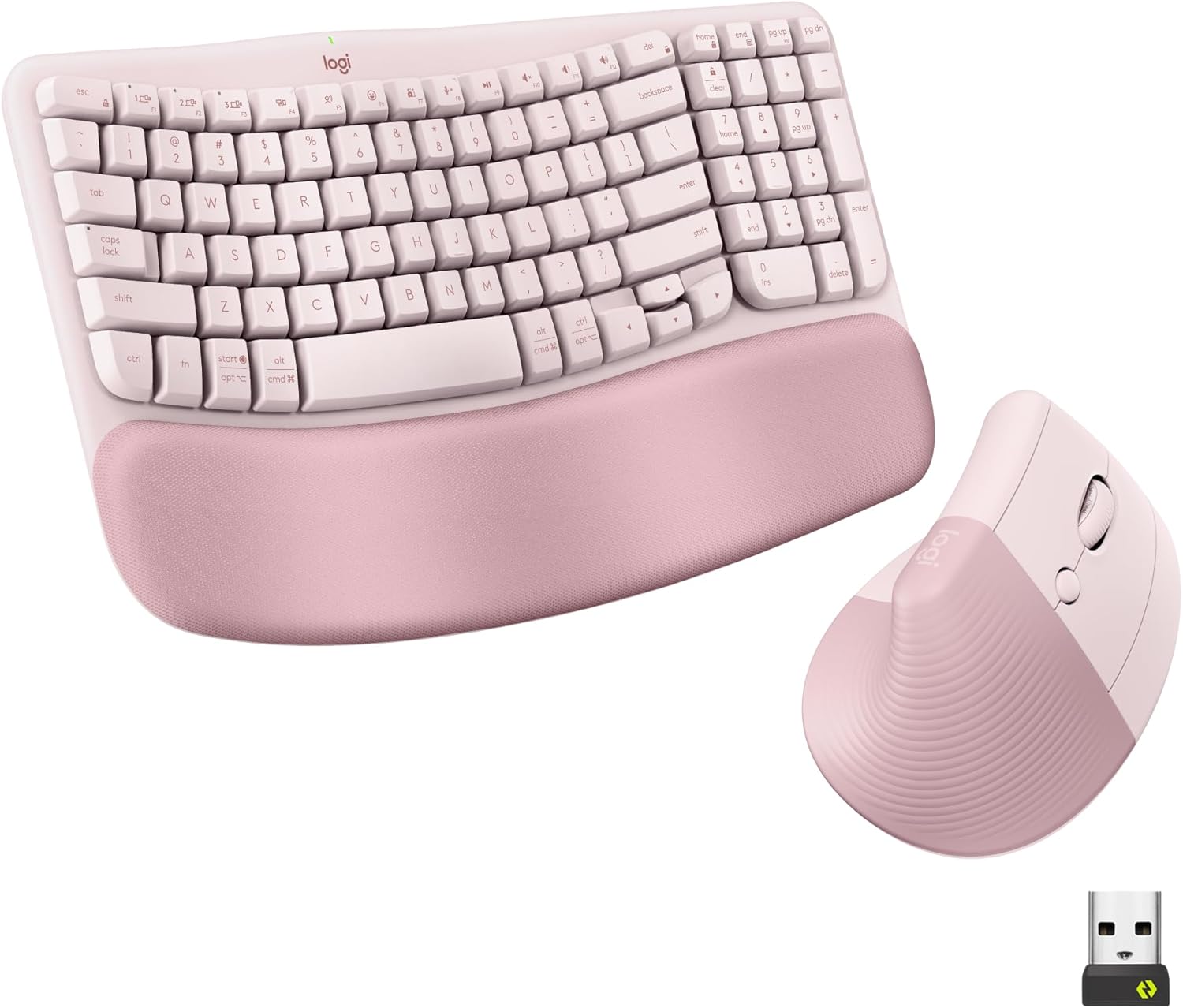
Logitech Wave Keys Keyboard & Lift Mouse Ergonomic Combo - Rose | Cushioned Palm Rest, wireless, Bluetooth, Easy-Switch, Multi-OS, Windows/Mac
This is a matched keyboard-and-mouse set built specifically around desk comfort, with Bluetooth and Logi Bolt receiver support for multi-device switching and a cushioned wave-shaped layout. Buyers note the tactile feel of the quiet plunger keys, which matters in a shared office.
- +Cushioned memory foam palm rest for wrist support
- +Bluetooth and Logi Bolt receiver support multi-device switching
- +Vertical mouse angle reduces forearm rotation strain
- −Lift mouse sized for small to medium hands only
- −No wired connection option for low-latency use

Wireless Keyboard and Mouse Combo, 2.4G Quiet Ergonomic Curved Keys(Black) | Full Size Ergonomic Curved Keyboard, 3-Level DPI Adjustable Silent Mouse for Windows, Mac OS, Desktop/Laptop/Office and Home
A straightforward 2.4GHz combo with quiet keys and a silent-click mouse, aimed at simple plug-and-play setup rather than software or app pairing. For outfitting many desks at once without per-unit complexity, this is the lower-cost route.
- +Curved keyboard layout with adjustable tilt legs
- +Quiet keys and mouse clicks for shared spaces
- +Simple plug-and-play 2.4GHz USB receiver setup
- −DPI tops out at 1600, low for precision tasks
- −No wrist rest or split-key ergonomic design

Logitech Ergo K860 Wireless Ergonomic Split Keyboard with Wrist Rest | Curved split keyframe, pillowed wrist rest, Bluetooth, USB connectivity with included USB Receiver, Windows Mac compatible
The Ergo K860's split, curved layout and attached memory foam wrist rest target teams where long daily typing sessions are the norm. It runs over Bluetooth or a USB receiver, so it pairs cleanly with any mouse a team member already has.
- +Split, curved layout designed to ease wrist strain
- +Three tilt-leg angles including negative tilt options
- +Attached memory foam wrist rest, nothing to misplace
- −Fixed split, not a fully separable two-piece keyboard
- −No per-key backlighting, only single-color options

Logitech Mouse MX Vertical, 910-005448
The MX Vertical connects via Bluetooth, USB receiver, or RF, which suits employees who move between a laptop and a desktop station. Its large ratings base on Amazon suggests it holds up across a wide range of daily-use conditions.
- +Vertical, adjustable angle designed to reduce wrist strain
- +Connects via Bluetooth, USB receiver, or RF
- +Rated 4.6/5 across over 13,700 Amazon ratings
- −Vertical shape is a change from standard mouse grips
- −No DPI or button count listed in the specs

Logitech M185 Compact Ambidextrous 2.4 GHz Wireless Mouse - Swift Grey | Ambidextrous mouse with 2.4 GHz USB-A Nano Receiver, Optical Tracking, 12-Months Battery Life, PC, Mac, Laptop compatible
With up to 12 months of battery life on a single AA and no drivers required on Windows or Mac, the M185 is built for a purchasing decision where reliability across dozens of identical units matters more than extra features.
- +Up to 12-month battery life with included AA battery
- +Works across Windows, Mac, and laptops without drivers
- +Compact ambidextrous shape suits small to medium hands
- −No programmable buttons or adjustable DPI
- −Uses a single AA battery, not rechargeable

TECKNET Wireless Mouse, BT 5.0/2.4G, Rechargeable 6-DPI Silent, Grey
Dual Bluetooth and 2.4G modes let this mouse pair with two devices, and its silent clicks are aimed directly at shared or open-plan spaces where every click is audible to the next desk.
- +Rechargeable battery rated for about 3 months per charge
- +Connects to two devices via Bluetooth or USB-A receiver
- +Six DPI levels from 800 to 4800 for flexible sensitivity
- −Side buttons do not work with macOS
- −DPI ceiling is modest for fast-paced gaming use
Keychron K8 Pro Wireless Mechanical Keyboard
The K8 Pro ships with both Mac and Windows keycap sets and is hot-swappable, which matters for offices where not every employee is on the same operating system. It's heavier and taller than a typical office board, so pair it with a wrist rest.
- +Hot-swappable switches, no soldering needed
- +Full QMK/VIA programmability
- +Mac & Windows keycaps included
- −Tall profile — a wrist rest is recommended
- −Heavier than typical office keyboards
What to look for
For an office setting, the spec that matters more than DPI or switch type is how many devices the keyboard and mouse can pair with and how cleanly they switch between them. Look for Bluetooth multi-pairing (2 to 3 devices) or a proprietary receiver like Logi Bolt that holds a stable connection across a crowded office full of other 2.4GHz signals. A single USB-A dongle works fine for one desktop but becomes a problem the moment someone wants to use a laptop and a docked monitor from the same peripherals.
Battery life specs are also a proxy for how often IT has to deal with replacement requests across a fleet of devices. A mouse or keyboard rated for 12 to 24 months on a single AA, or with USB-C recharging, means less recurring maintenance than something that needs charging every few weeks. If your team is mixed Windows and Mac, check for included Mac keycaps or explicit macOS support in the listing — several budget mice in this category have side buttons that simply don't function on macOS, which is worth knowing before you order forty of them.
This guide is compiled from manufacturer specifications and aggregated customer feedback on Amazon, with AI assistance in drafting. We have not personally tested every product listed. Prices and availability change frequently — always confirm on Amazon before buying.