USB Microphones with a Physical Mute Button for Zoom
Zoom already has a software mute toggle, but fumbling for it mid-sentence or forgetting it's on is a common complaint. A hardware mute button on the mic itself — usually with an LED that shows your status at a glance — solves that without touching your keyboard or the Zoom window.
The options here range from simple gooseneck mics built for video calls to condenser mics that double as podcast or streaming gear. What separates them is how the mute control works (tap-sensor vs. physical button), how visible the mute status is, and whether the mic is overkill for someone who just wants clear calls without extra software.
Picks below were chosen from manufacturer specs and aggregated buyer feedback, prioritizing mics that explicitly list a mute button or tap-to-mute control and plug-and-play USB operation, since that's what a Zoom user actually needs.
We may earn a commission at no extra cost to you.

CMTECK USB Computer Microphone G009, Noise-Cancelling Recording Desktop Mic for PC/Laptop for Online Chatting, Home Studio, Podcasting, Gaming, Skype, YouTube with Mute Function(Windows/Mac) | Built-in pop filter and metal base. 360° adjustable neck, mute button. Great for podcasting, gaming, YouTube (Windows/macOS)
CMTECK built this specifically around chatting and video calls rather than music recording, with a physical mute button, LED status light, and a cardioid pattern that keeps room noise out of Zoom without any setup steps.
- +Plug-and-play USB setup, no drivers required
- +Built-in pop filter reduces plosive sounds
- +Mute button with LED status indicator
- −Not compatible with Linux, Android, or Raspberry Pi
- −No external power option or gain control mentioned

HyperX SoloCast 2 – Gaming USB Condenser Mic for PC, USB-C to USB-A, Built-in Pop Filter, Internal Shock Mount, Plug and Play, 24-bit / 96kHz, Compact Tiltable Stand – Black
The SoloCast 2 is plug-and-play with a tap-to-mute button and visible LED indicator right on the mic, plus a built-in pop filter and tiltable stand so there's nothing extra to buy before your first call.
- +Cardioid pattern reduces side and rear background noise
- +Built-in pop filter and shock mount, no extra parts needed
- +Tap-to-mute with visible LED status indicator
- −USB-only, no XLR option for larger audio setups
- −Advanced sound shaping requires installing NGENUITY software

Razer Seiren V3 Mini USB Microphone, Supercardioid Condenser Mic, Black | Tap-to-Mute Sensor with LED Indicator, Shock Absorber, Ultra Compact, Works with OBS, Discord, Zoom, Teams
Razer's tap-to-mute sensor with LED indicator sits on a compact footprint that suits tight desk space, and the supercardioid pattern is tuned to isolate a single speaker's voice, which is exactly the Zoom use case.
- +Supercardioid pattern targets voice, cuts side/rear noise
- +True plug-and-play, no drivers needed
- +Hardware tap-to-mute with LED status indicator
- −Advanced settings require installing Razer Synapse separately
- −Tight pickup pattern needs close, consistent mic positioning

Logitech Creators Blue Yeti USB Microphone for PC, Mac, Gaming, Recording, Streaming, Podcasting, Studio and Computer Condenser Mic with Blue VO!CE effects, 4 Pickup Patterns, Plug and Play - Blackout | VO!CE effects, 4 pickup patterns, plug-and-play operation
The Blue Yeti pairs onboard mute, gain, and volume dials with four pickup patterns, so it handles both routine one-on-one Zoom calls and group calls around a single desk without switching hardware.
- +Four pickup patterns cover solo, interview, and ambient recording
- +Onboard gain, mute, and volume controls for quick adjustments
- +No-latency headphone monitoring while recording
- −Desktop stand design isn't built for portability
- −Buyers report it picks up room noise and echo easily
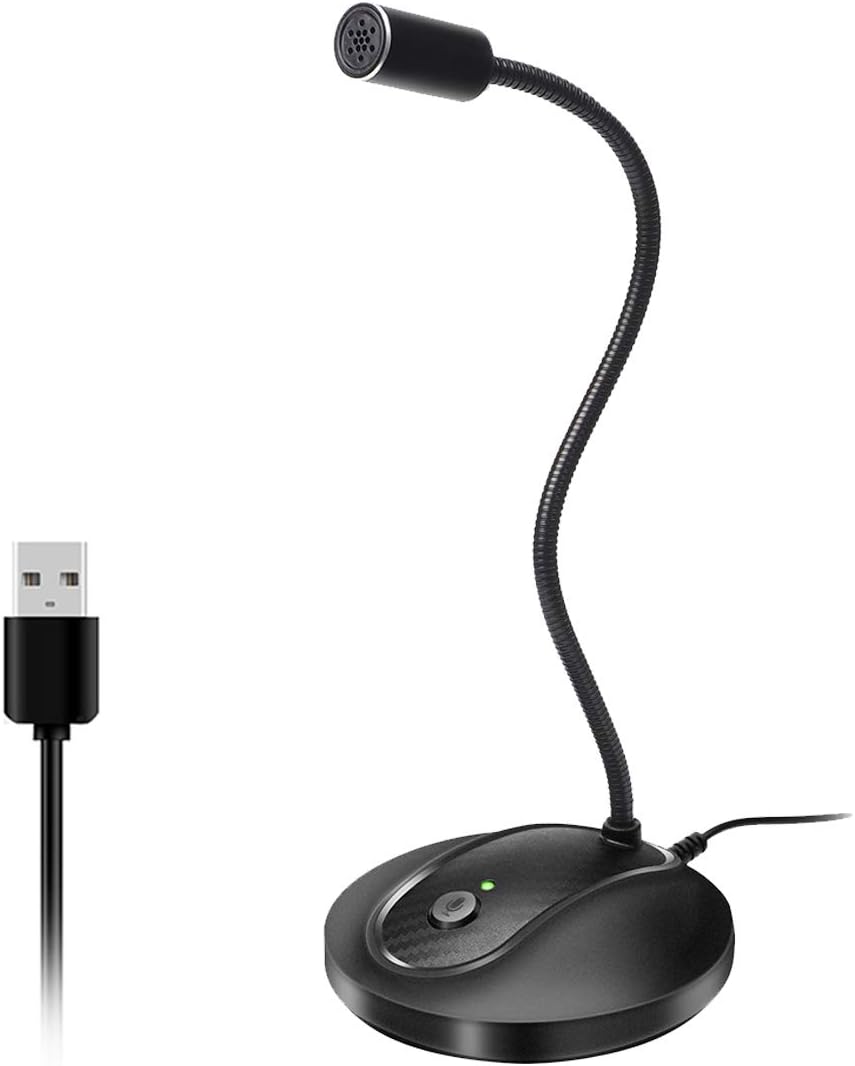
USB Microphone, 360 Degree Adjustable Gooseneck Design, Mute Button & LED Indicator, Noise-Canceling Technology, Plug & Play, Compatible with Windows & MacOS
JOUNIVO's 360-degree gooseneck lets you position the mic exactly at mouth level for a webcam frame, and the one-click mute button with LED status covers the core ask at a low price point.
- +360-degree gooseneck arm for flexible positioning
- +One-click mute button with LED status indicator
- +True plug and play, no drivers needed
- −Not compatible with Xbox, Raspberry Pi, or Android
- −Omnidirectional pattern picks up ambient room noise

Amazon Basics Condenser Microphone for PC, Cardioid Pickup, USB Mic for Streaming, Recording, and Podcasting, 360° Adjustable Stand, Plug and Play, 5.8" x 3.4", Black
Amazon Basics keeps it to the essentials: one-tap mute, cardioid pickup, and a 360-degree stand, for anyone who just wants to replace a laptop mic for Zoom without extra features to learn.
- +USB plug-and-play, no drivers or interface needed
- +Cardioid pattern targets voice, reduces side noise
- +One-tap mute useful for calls and streams
- −Only one polar pattern, no switchable options
- −No gain, EQ, or advanced controls listed

Shure MV7+ USB-C & XLR Podcast Dynamic Microphone - Black
The Shure MV7+ has a touch panel with tap-to-mute plus real-time denoising, and its dual USB-C/XLR design means it still works if you eventually add an audio interface for podcasting beyond Zoom calls.
- +Dual USB-C and XLR outputs for flexible setups
- +Auto Level Mode and real-time denoising simplify clean audio
- +Built-in reverb effects without extra software
- −Touch panel controls only, no physical gain dial
- −Full XLR benefits require a separate audio interface
What to look for
The two things that matter most for this use case are how the mute control is triggered and whether the LED indicator is easy to see out of the corner of your eye during a call. Tap-sensor mute (found on the Razer, HyperX, and Shure mics) responds instantly and doesn't require pressing hard enough to bump the mic stand; a physical push-button (CMTECK, JOUNIVO, Amazon Basics) is more tactile but can shift a lightweight desk mic if you're not careful. Either way, confirm the listing mentions an LED status light — a mute button without a visible indicator just moves the same problem from software to hardware.
Polar pattern matters more than most buyers expect. A cardioid pattern picks up your voice and rejects sound from the sides and rear, which helps in shared apartments or open offices. Omnidirectional mics pick up the whole room, which is fine in a quiet home office but frustrating anywhere with background noise. Skip anything that requires an audio interface or a companion app just to function — for Zoom calls, true plug-and-play is worth more than extra pickup patterns or DSP you'll never touch.
This guide is compiled from manufacturer specifications and aggregated customer feedback on Amazon, with AI assistance in drafting. We have not personally tested every product listed. Prices and availability change frequently — always confirm on Amazon before buying.