Quietest Wireless Keyboard and Mouse Combos for Open Offices
Shared offices put two things at odds: you need a keyboard and mouse that work, and you need them to not announce every keystroke to the person three feet away. That means looking past DPI counts and RGB lighting toward click volume, switch type, and how the set behaves during a normal 8-hour day of typing and clicking near other people.
The options here split into two groups: actual bundled combos sold as a matched keyboard-and-mouse set, and a couple of standalone pieces worth pairing yourself when your hand size or typing style doesn't fit the bundles. Battery life and multi-device pairing matter too, since shared desks and hot-desking setups often mean switching between a laptop and a desktop without digging for a new receiver.
Picks were narrowed to sets and pairings with an explicit quiet-click spec, a documented noise-reduction claim, or buyer feedback that repeatedly calls out low click and key noise, rather than products that just use the word "quiet" in the title.
We may earn a commission at no extra cost to you.

Wireless Keyboard and Mouse Combo, SABLUTE MA41 30dB Quiet Ergonomic Wave Keyboard Set with Soft Leather Palm Rest, Dual-System Switch for Windows/Mac, Ideal for Business Teams Home Office | Soft Leather Memory Foam Wrist Rest, 2.4GHz Wireless, UAB-A & USB-C Adapter, Compatible with Windows & Mac Computers Laptops
This is the only combo in the pool with an actual decibel figure attached to its quiet claim (30dB), plus a leather-padded wrist rest and a single 2.4GHz receiver that works across Windows and Mac, which covers most shared-office setups without extra pairing steps.
- +Ergonomic wave shape with two adjustable tilt angles
- +Leather-cushioned wrist rest for typing comfort
- +Rated for 10 million keystrokes, 2-year warranty
- −Batteries not included (2 AAA, 1 AA)
- −Three shortcut functions unavailable on macOS
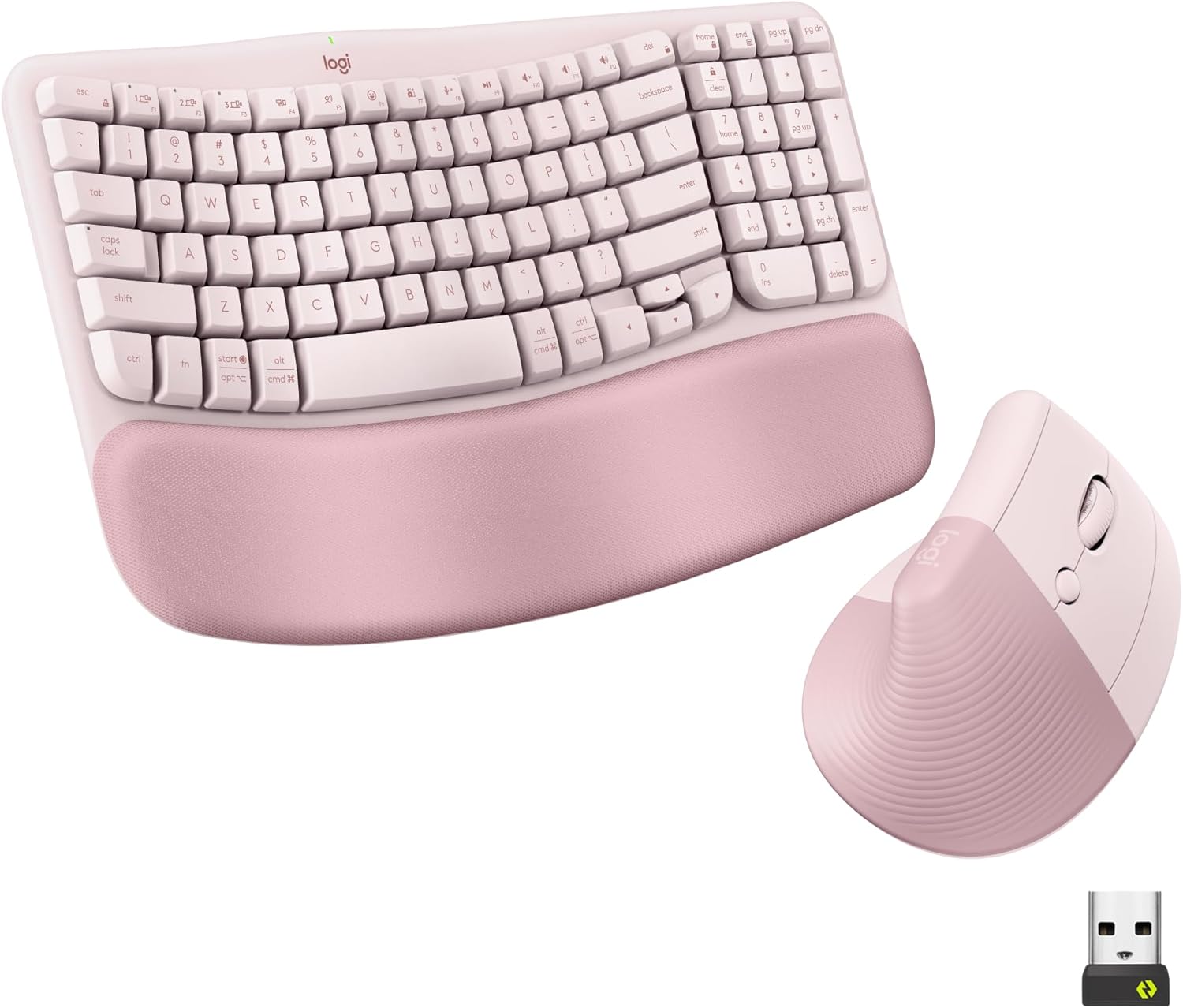
Logitech Wave Keys Keyboard & Lift Mouse Ergonomic Combo - Rose | Cushioned Palm Rest, wireless, Bluetooth, Easy-Switch, Multi-OS, Windows/Mac
Pairs Logitech's Wave Keys with the Lift vertical mouse, both built around quiet plunger switches and clicks that buyers note specifically for their tactile-but-hushed feel. Logi Bolt and Bluetooth multi-device switching suit an office where you move between machines.
- +Cushioned memory foam palm rest for wrist support
- +Bluetooth and Logi Bolt receiver support multi-device switching
- +Vertical mouse angle reduces forearm rotation strain
- −Lift mouse sized for small to medium hands only
- −No wired connection option for low-latency use

SABLUTE Ergonomic Wireless Keyboard and Mouse Combo, Rechargeable 4000mAh Backlit Keyboard with Soft Faux Lambskin Palm Rest, Wave Keys for Natural Typing, Compatible with Windows/Mac/Chrome OS
A 4000mAh rechargeable battery rated for weeks per charge means fewer AA swaps at a shared desk, and the faux-leather palm rest is sweat-resistant, which matters more when a keyboard sees multiple users or long single sessions.
- +4000mAh battery rated for weeks per charge
- +10 million keystroke durability rating
- +Adjustable stands support different sitting or standing postures
- −Mouse DPI tops out at 1600, low for precision work
- −Wave key design is a moderate ergonomic step, not a full split layout

Wireless Keyboard and Mouse Combo, 2.4G Quiet Ergonomic Curved Keys(Black) | Full Size Ergonomic Curved Keyboard, 3-Level DPI Adjustable Silent Mouse for Windows, Mac OS, Desktop/Laptop/Office and Home
A straightforward curved combo with quiet keys and a silent-click mouse, plus eight shortcut keys. It's a reasonable entry point for an office that just needs the noise problem solved without paying for ergonomic extras.
- +Curved keyboard layout with adjustable tilt legs
- +Quiet keys and mouse clicks for shared spaces
- +Simple plug-and-play 2.4GHz USB receiver setup
- −DPI tops out at 1600, low for precision tasks
- −No wrist rest or split-key ergonomic design

Logitech Ergo K860 Wireless Ergonomic Split Keyboard with Wrist Rest | Curved split keyframe, pillowed wrist rest, Bluetooth, USB connectivity with included USB Receiver, Windows Mac compatible
The split, curved Ergo K860 is built for hours of daily typing rather than a compact combo board, and its negative-tilt options suit people whose hands don't fit the smaller wave-style keyboards in the bundled combos above.
- +Split, curved layout designed to ease wrist strain
- +Three tilt-leg angles including negative tilt options
- +Attached memory foam wrist rest, nothing to misplace
- −Fixed split, not a fully separable two-piece keyboard
- −No per-key backlighting, only single-color options

Logitech Signature M550 L Full Size Wireless Mouse Large Sized - Black | For Large Sized Hands, 2-Year Battery, Silent Clicks, Multi-Device Compatibility
Logitech's stated 90 percent click-noise reduction via SilentTouch is the most specific quiet-mouse claim in the pool, and its full-size body is sized for larger hands that the vertical and compact mice here aren't built for. Pairs naturally with the K860 above.
- +Designed specifically for larger hands and long sessions
- +Up to 24-month battery life on one AA
- +SilentTouch cuts click noise by a stated 90 percent
- −Not suited to smaller or average-sized hands
- −No specs suggesting gaming-level precision or speed

TECKNET Compact Ambidextrous Wireless Mouse for Laptop Mint Green | 2.4G Quiet Computer Mouse with USB Receiver, 3 Adjustable DPI Portable Cordless Mice for Chromebook, Laptop, PC, Mac
Compact enough to toss in a bag and quiet enough that buyer feedback repeatedly calls it out by name, this suits anyone with smaller hands who needs a mouse to pair with a shared or borrowed keyboard rather than a full matched set.
- +Compact size suits small to medium hands well
- +Quiet clicks, repeatedly praised in buyer feedback
- +Receiver stores inside mouse, nothing extra to carry
- −Small body may cramp larger hands over time
- −Basic optical sensor, not built for precision work
What to look for
Almost every mouse on Amazon claims to be "quiet" now, so treat that word skeptically. What actually tells you something is a stated decibel figure (rare, but the SABLUTE MA41 has one), a named noise-reduction system with a percentage attached (Logitech's SilentTouch claims a 90 percent click-noise cut), or a pattern of buyer feedback specifically calling out low noise rather than general satisfaction. Membrane and plunger-switch keyboards are inherently quieter than mechanical ones regardless of marketing, so if a shared office is the priority, skip mechanical boards entirely unless they specify sound-dampening foam or a gasket mount.
For the combo itself, check how it connects. A single 2.4GHz receiver covering both keyboard and mouse is one less thing to lose and usually pairs faster than Bluetooth, but Bluetooth or multi-device switching matters more if you're hot-desking between a laptop and a desktop. Battery life numbers are usually best-case (no backlighting, moderate use), so read them as a ceiling, not a guarantee.
This guide is compiled from manufacturer specifications and aggregated customer feedback on Amazon, with AI assistance in drafting. We have not personally tested every product listed. Prices and availability change frequently — always confirm on Amazon before buying.