Wireless Keyboard and Mouse Combos for USB-C-Only Laptops
This search usually comes from someone whose laptop only has USB-C ports and doesn't want to dig up a USB-A dongle or an adapter every time they sit down. The catch is that a true "USB-C receiver" is rare in current retail listings — most 2.4GHz wireless keyboards and mice still ship with a USB-A nano receiver, and when a spec sheet says "USB-C," it usually means the device has a USB-C port for wired use or charging, not that the tiny wireless dongle itself is USB-C shaped.
Because of that, the real options split two ways: pick one of the few actual boxed keyboard-and-mouse combos, or build your own combo from a keyboard with a USB-C wired mode and a mouse that pairs over Bluetooth, which sidesteps the receiver question entirely.
The picks below were chosen from the specs that actually confirm a USB-C port, a Bluetooth mode, or a genuine two-piece combo, plus what buyers report about day-to-day reliability.
We may earn a commission at no extra cost to you.

Wireless Keyboard and Mouse Combo, 2.4G Quiet Ergonomic Curved Keys(Black) | Full Size Ergonomic Curved Keyboard, 3-Level DPI Adjustable Silent Mouse for Windows, Mac OS, Desktop/Laptop/Office and Home
This is one of the few products in the pool that's an actual matched keyboard-and-mouse set sharing a single 2.4GHz nano receiver, which is what most people picture when they search for a combo, even though that receiver is USB-A and will need an adapter on a USB-C-only machine.
- +Curved keyboard layout with adjustable tilt legs
- +Quiet keys and mouse clicks for shared spaces
- +Simple plug-and-play 2.4GHz USB receiver setup
- −DPI tops out at 1600, low for precision tasks
- −No wrist rest or split-key ergonomic design
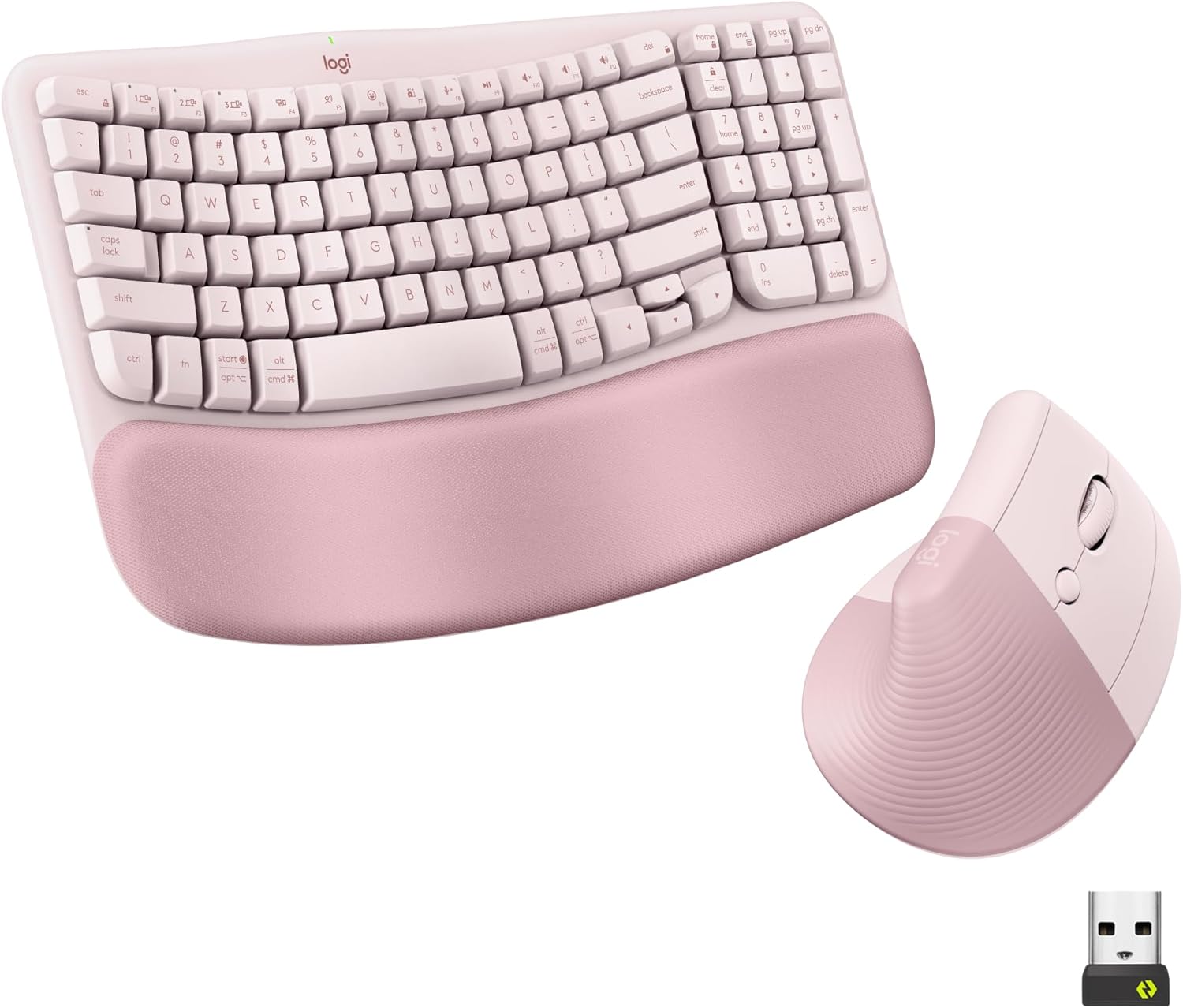
Logitech Wave Keys Keyboard & Lift Mouse Ergonomic Combo - Rose | Cushioned Palm Rest, wireless, Bluetooth, Easy-Switch, Multi-OS, Windows/Mac
Pairs the Wave Keys keyboard with the Lift mouse over Bluetooth or the compact Logi Bolt receiver, so on a USB-C laptop you can skip the receiver question altogether and connect both pieces wirelessly with no dongle at all.
- +Cushioned memory foam palm rest for wrist support
- +Bluetooth and Logi Bolt receiver support multi-device switching
- +Vertical mouse angle reduces forearm rotation strain
- −Lift mouse sized for small to medium hands only
- −No wired connection option for low-latency use

AULA F75 75% Wireless Mechanical Keyboard, Hot Swappable Creamy Keyboard, Pre-lubed Reaper Switches, 2.4GHz/Type-C/BT5.0, RGB Backlit Gaming Keyboards(White & Blue)
Lists Type-C as one of three connection modes alongside 2.4GHz and Bluetooth, so it can plug directly into a USB-C port when you want a wired fallback, then switch to wireless without carrying a separate receiver; pair it with one of the mice below for a build-your-own combo.
- +Connects to five devices via 2.4GHz, Bluetooth, or USB-C
- +Hot-swappable switches support 3-pin or 5-pin replacements
- +Compact 75% layout keeps arrow keys, saves desk space
- −No published battery life figures for wireless use
- −House-brand Reaper switches lack the track record of major brands

Logitech G PRO X2 SUPERSTRIKE Wireless Gaming Mouse - Black/White | Customizable Rapid Trigger Magnetic Analog Switches, Adjustable Click Haptics, 61g Lightweight, USB-C, <8K, For PC/Mac
Charges and can connect over its USB-C port, with LIGHTSPEED wireless for actual use, making it a straightforward half of a custom combo for anyone whose desk only has USB-C cables on hand and wants a mouse tuned for competitive play.
- +61 g body suits fast, low-effort flick movements
- +10-level actuation and 5-level rapid trigger tuning
- +Haptic feedback per click via HITS system
- −Advanced click customization requires Logitech G HUB software
- −POWERPLAY charging pad sold separately

TECKNET Wireless Mouse, Side Scroll Bluetooth Rechargeable, 3-Device | Switch Among 3 Devices, 6 DPI Levels (up to 4800 DPI), BT 5.3/5.0/2.4G USB-A, Quiet Clicks, 7 Buttons, Ergonomic, Black
Offers Bluetooth 5.3/5.0 as well as a 2.4GHz USB-A receiver, so it still connects over Bluetooth on a USB-C-only laptop while keeping the receiver option for a desktop; the side scroll wheel is a plus for spreadsheet-heavy work.
- +Connects to 3 devices via dual Bluetooth and 2.4GHz USB-A
- +Side scroll wheel supports horizontal navigation
- +6 DPI levels up to 4800 for varied tasks
- −Side buttons not supported on macOS
- −No gaming-oriented specs like adjustable polling rate

Afaartcci Rechargeable Wireless Mouse, Silent Bluetooth Mouse (Black) | ergonomic design,Bluetooth 5.2 and 2.4GHz USB Receiver,Portable Computer Mouse for Laptops, iPads, MacBooks & Apple Devices
Bluetooth 5.2 pairing removes the receiver question entirely, and its compact size suits pairing with a USB-C keyboard for a minimal travel setup between a laptop and a tablet.
- +Switches between two devices via Bluetooth or USB receiver
- +Silent clicks suit offices and shared spaces
- +Compact 4.4 x 2.3 x 1.1 inch travel-friendly size
- −Can't use Bluetooth and USB receiver at the same time
- −No DPI adjustment settings listed in specs
What to look for
Read the connectivity line closely before you buy. "2.4GHz with USB receiver" almost always means a USB-A dongle, and it will need an adapter or a hub on a USB-C-only laptop. "USB-C" listed as a connection mode next to 2.4GHz and Bluetooth usually describes a wired port on the keyboard or mouse itself, not the shape of the wireless dongle — useful for charging or a lag-free wired fallback, but not a substitute for checking whether Bluetooth is also on board.
If skipping dongles entirely is the goal, Bluetooth pairing is the most dependable path on a USB-C laptop, since it needs no receiver of any kind. If you'd rather keep one physical receiver for both keyboard and mouse, a matched combo set is simpler than pairing two separate wireless devices, even if that receiver is USB-A and needs an adapter.
This guide is compiled from manufacturer specifications and aggregated customer feedback on Amazon, with AI assistance in drafting. We have not personally tested every product listed. Prices and availability change frequently — always confirm on Amazon before buying.